Notion PDF header, footer and page numbers
A header, a footer and a number on every sheet.
Type the text once, see it on each sheet in the preview, then print. Add your logo with Pro.
Free for single pages, unlimited and without a watermark.
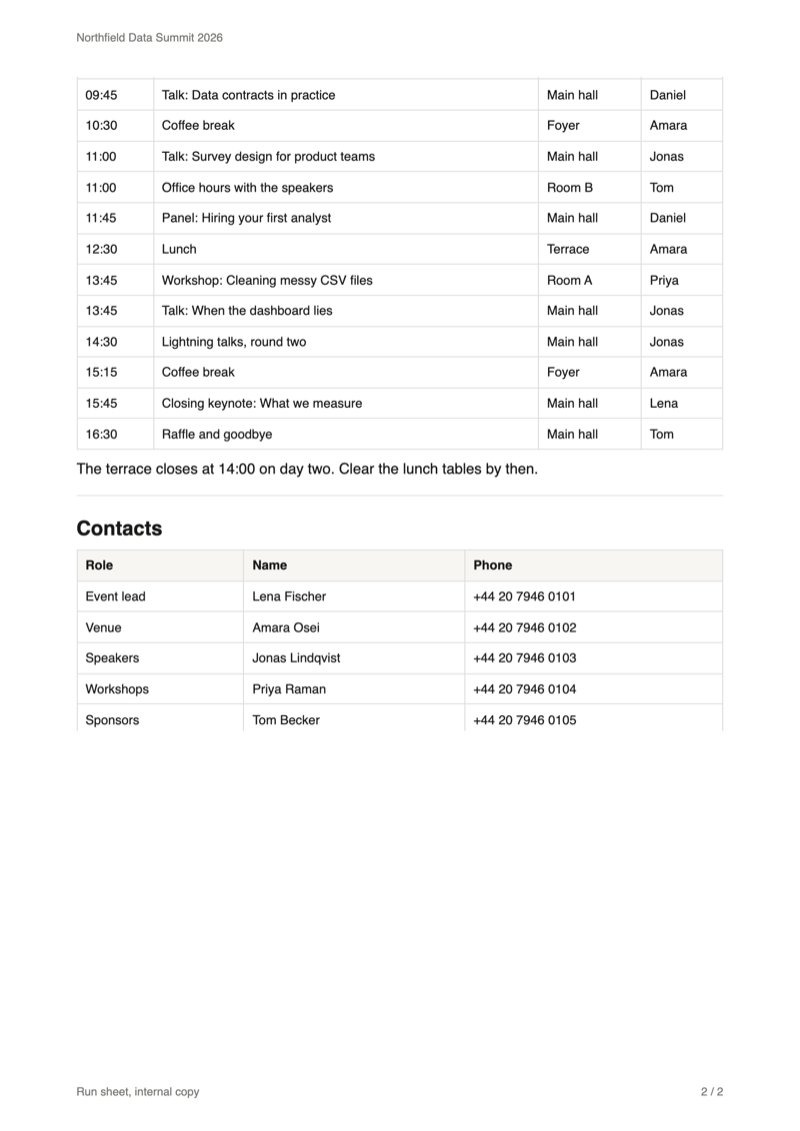
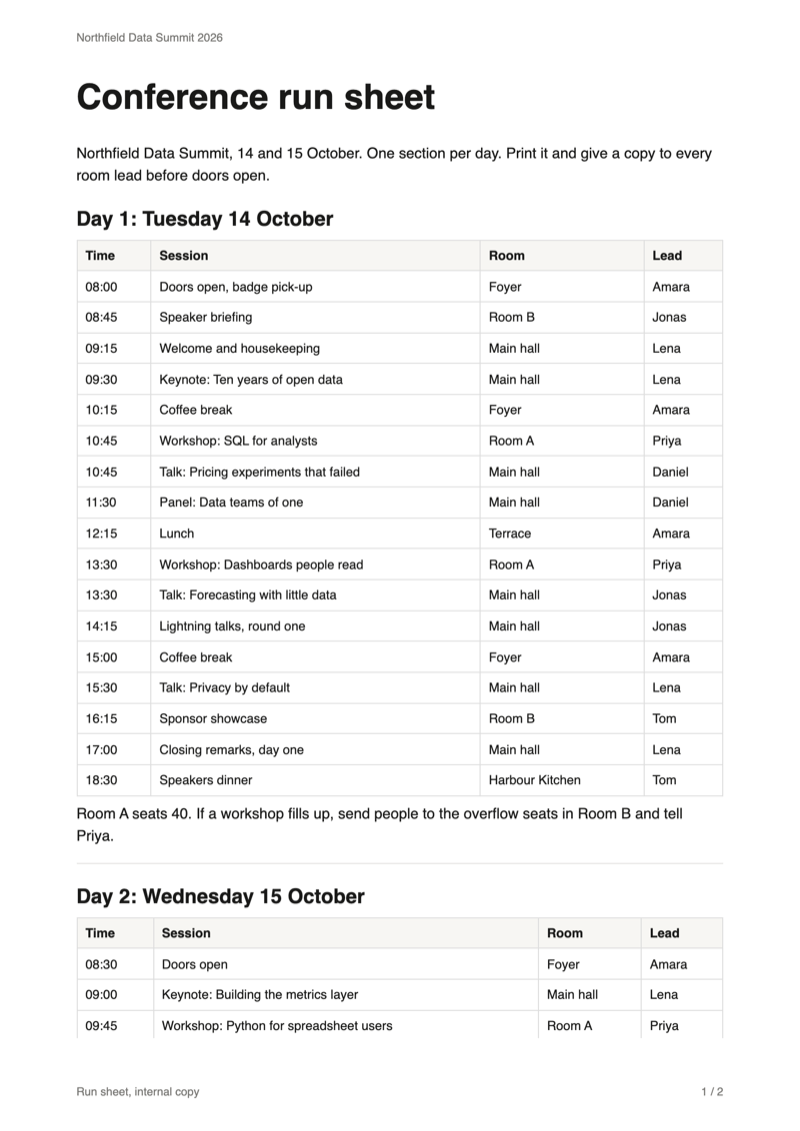
The problem
Why a Notion PDF comes without a header or page numbers
Notion's own PDF export offers paper size, scale and whether to include images, and nothing for the margins of a sheet. What you print is the page and nothing around it.
Loose sheets
A run sheet, a policy or a handout loses its order once the sheets are separated, and nothing on a sheet says what it belongs to.
No page count
A reader cannot tell whether a sheet is missing, and you cannot point to "the table on page 4" in a meeting.
No place for a label
"Internal copy", an event name or a version stays in the Notion page, in the body text, instead of sitting on every sheet where it belongs.
Notion's export options as described in Notion's help centre, October 2026.
Reference
Where each part is printed
Header, footer, logo and sheet number go into the margin of every sheet, so they never push the text of your page aside.
| Part | Position | Free |
|---|---|---|
| Header text | Top left, in small grey type. | Yes |
| Footer text | Bottom left, in the same type. | Yes |
| Sheet number | Bottom right, written "1 / 3": this sheet, then the total. | Yes |
| Logo, header | Top right, next to the header text. PNG, JPEG, WebP or SVG up to 5 MB. | Pro |
| Logo, footer | Bottom centre, between footer text and sheet number. | Pro |
Each part needs a margin to print in. With "None" as the margin the panel shows a warning.
Guide
How to add a header, footer and page numbers to a Notion PDF
Three steps in your open Notion tab. Your page is only read, never changed.
Open the export panel
Click PDF in the Notion top bar, next to Share. The preview opens with the page as it will print.

Tick "Number the sheets" and type your text
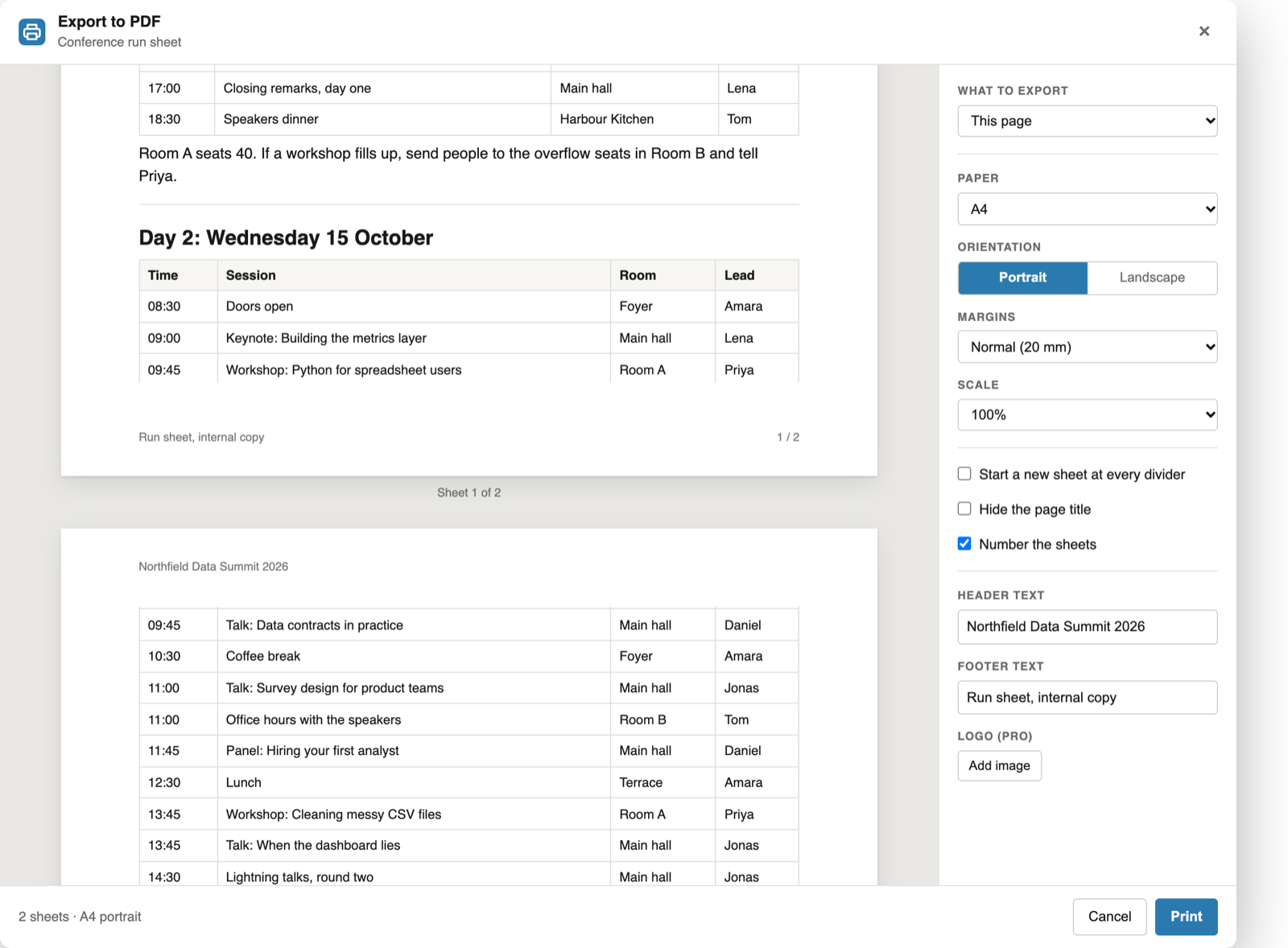
Under "Header text" and "Footer text", type what each sheet should carry. Tick "Number the sheets" for "1 / 2" in the bottom right corner. Everything shows in the preview as you type.
The settings are remembered, so the next page you print has the same header and footer.
Check the sheets, then print
Scroll through the preview. Each sheet shows its header, footer and number at the real position, and the line under it reads "Sheet 1 of 2".
Click Print and choose "Save as PDF". The print job is the same document the preview drew.
Good to know
What the header and footer do and do not do
The same on every sheet
The text prints as you type it. It takes no fields such as the page title or today's date, and it cannot differ between sheets.
Numbers for the whole PDF
One print job is one PDF, so the numbers run on across exported subpages and across the documents of the document generator.
Margins make room
A header sits in the margin, so a larger margin gives it more space. The sheet keeps its size, and the page breaks move with the margins.
FAQ
Notion PDF header, footer and page numbers: common questions
How do I add page numbers to a Notion PDF?
Open the page, click PDF next to Share and tick "Number the sheets". Every sheet prints "1 / 3" in the bottom right corner, counting the sheets of the whole PDF. It is free.
Can I add a header and footer to a Notion PDF?
Yes. Type the text under "Header text" and "Footer text" in the export panel. The header prints top left and the footer bottom left of every sheet, in small grey type. Both are free.
Can I put my logo in the header of a Notion PDF?
Yes, with Pro. Add a PNG, JPEG, WebP or SVG image and choose Header, which prints it top right, or Footer, which prints it bottom centre. The preview shows the logo for free, printing it needs a licence.
Why do the header and page numbers not show in my PDF?
They print in the page margin, so the margin must not be set to None. The panel shows a warning when a header, footer, logo or sheet number has no margin to print in.
Can the header show the page title or the date?
No. Header and footer text is printed as you type it, the same on every sheet. Fields such as the page title or today's date are not supported.
Do the page numbers run across subpages or several documents?
Yes. One print job is one PDF, so the numbers run through the whole PDF: "1 / 12" on the first of twelve sheets, even when it holds several subpages or documents.
Is it free?
Yes, for single pages and without a limit: header text, footer text and sheet numbers. Pro, at $6.99 a month or $59 a year, adds your logo, subpages and the document generator.
Print your next Notion page with a header and page numbers
Add the extension, open the page and click PDF next to Share.
Add to Chrome