Export Notion subpages to PDF
Your whole Notion wiki in one PDF.
Export a page together with every page nested inside it, up to five levels deep, as one PDF in reading order. On any Notion plan, no Business plan needed.
The preview is free. Printing a page with its subpages is part of Pro, from $4.92 a month.
Exporting Notion subpages to PDF in short
Notion PDF Export prints a Notion page and its subpages as one PDF, up to five levels deep, in reading order, on any Notion plan, Free and Plus included. Notion's own PDF export includes subpages only on its Business and Enterprise plans. Each subpage starts on a new sheet, or runs on after the previous one. Choosing subpages and the preview of the first five pages are free; printing a page with its subpages is part of Pro. Exporting single pages stays free.
The problem
Why Notion's PDF export leaves subpages out
Notion offers "Include subpages" for PDF only on its Business and Enterprise plans. On Free and Plus, each page becomes its own PDF, so a handbook of forty pages means forty exports.
| Notion plan | Notion's own PDF export | Notion PDF Export |
|---|---|---|
| Free | One page per PDF | Subpages with Pro |
| Plus | One page per PDF | Subpages with Pro |
| Business and Enterprise | Include subpages | Subpages with Pro, plus header, footer and page numbers |
Notion's export options as described in Notion's help centre, September 2026.
Guide
How to export a Notion page with subpages to PDF
Three steps from a page tree to one PDF. Everything happens in your open Notion tab, and your pages are only read, never changed.
Open the top page and click PDF
Open the page that holds the others: a wiki, a handbook, a client space or a course. Subpages count wherever they sit on it, in the page body, inside toggles or in columns.
Click PDF in the Notion top bar, next to Share.

Choose the subpages and how deep to go
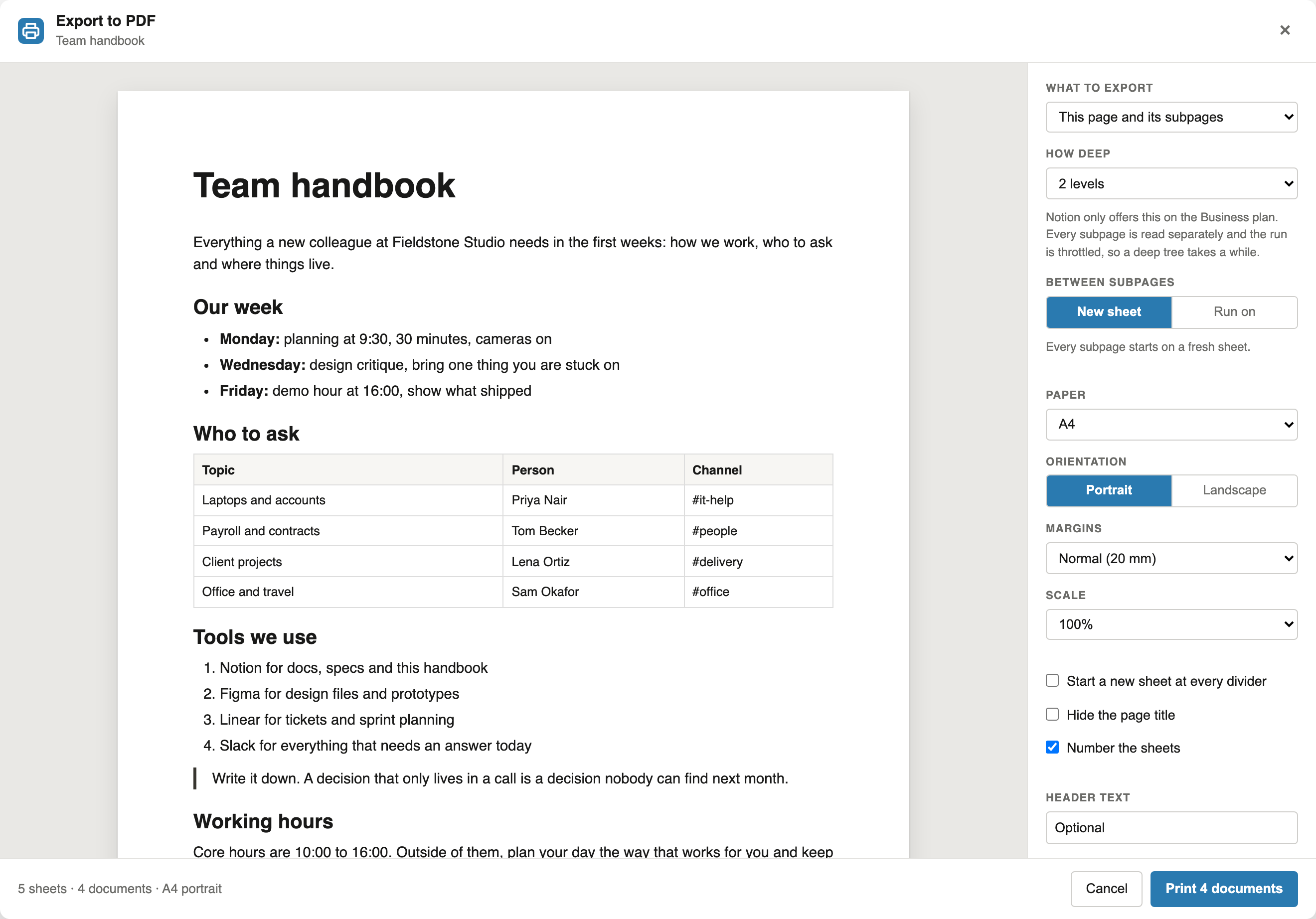
Under "What to export", pick "This page and its subpages". Under "How deep", pick "Direct subpages" or 2, 3, 4 or 5 levels. The panel reads every subpage and counts along as it goes.
Under "Between subpages", "New sheet" starts every subpage on a fresh sheet, and "Run on" lets it follow the previous one. Paper, margins, header, footer and page numbers apply to the whole PDF.
Print once, save one PDF
One print dialog opens for the whole tree. Choose "Save as PDF" to get a single file: the top page first, then every subpage followed by its own subpages. Each page starts with its title, unless you hide page titles.
Reference
What goes into the PDF
| Question | Answer |
|---|---|
| How deep | Direct subpages, or up to five levels below the page you start from. |
| Order | Reading order. Each subpage is followed by its own subpages before the next one starts. |
| Where subpages are found | Anywhere on the page, including inside toggles and columns. On the parent page, a subpage prints as its title. |
| Database rows | Not exported as pages. To print one document per row, use the Notion mail merge. |
| Pages you cannot open | Left out, and the panel says how many pages could not be read. |
| Size of a run | Up to 200 pages. Notion is asked for one page at a time, so a large tree takes a while. |
| Around the text | Paper size, orientation, margins, scale, header, footer and sheet numbers apply to every page. Your logo goes top right or bottom centre. |
FAQ
Exporting Notion subpages: common questions
Can I export Notion subpages to PDF on the free plan?
Notion itself includes subpages in a PDF only on Business and Enterprise. With this extension you can on any Notion plan, Free and Plus included. Exporting subpages is part of its Pro plan, and the preview is free.
How many levels deep can it go?
Up to five levels below the page you start from. Choose "Direct subpages" for one level.
Do I get one PDF or one file per subpage?
One PDF. Each subpage starts on a new sheet, or follows the previous one if you choose "Run on".
Are the rows of a database exported too?
No. Database rows are not treated as subpages. To print one document per row, such as invoices, use the Notion mail merge.
Is the PDF real text or an image?
Real text. The PDF comes from your browser's print dialog, so you can search, select and copy it.
Is it free?
Choosing subpages and previewing the first five pages is free. Printing a page with its subpages is part of Pro, at $6.99 a month or $59 a year. Exporting single Notion pages to PDF stays free.
Are my Notion pages uploaded?
No. The extension reads the pages in your open Notion tab and builds the PDF in your browser. It never changes your pages.
Export your first handbook as one PDF
Add the extension, open the top page and click PDF next to Share.
Add to Chrome