Notion's built-in PDF export compared
Notion's own PDF export and this extension, side by side.
Notion's export is fine for a quick copy. Subpages need a Business plan for the whole workspace, and the sheets get no header, footer or page numbers.
Facts about Notion are taken from notion.com and Notion's help centre, October 2026.
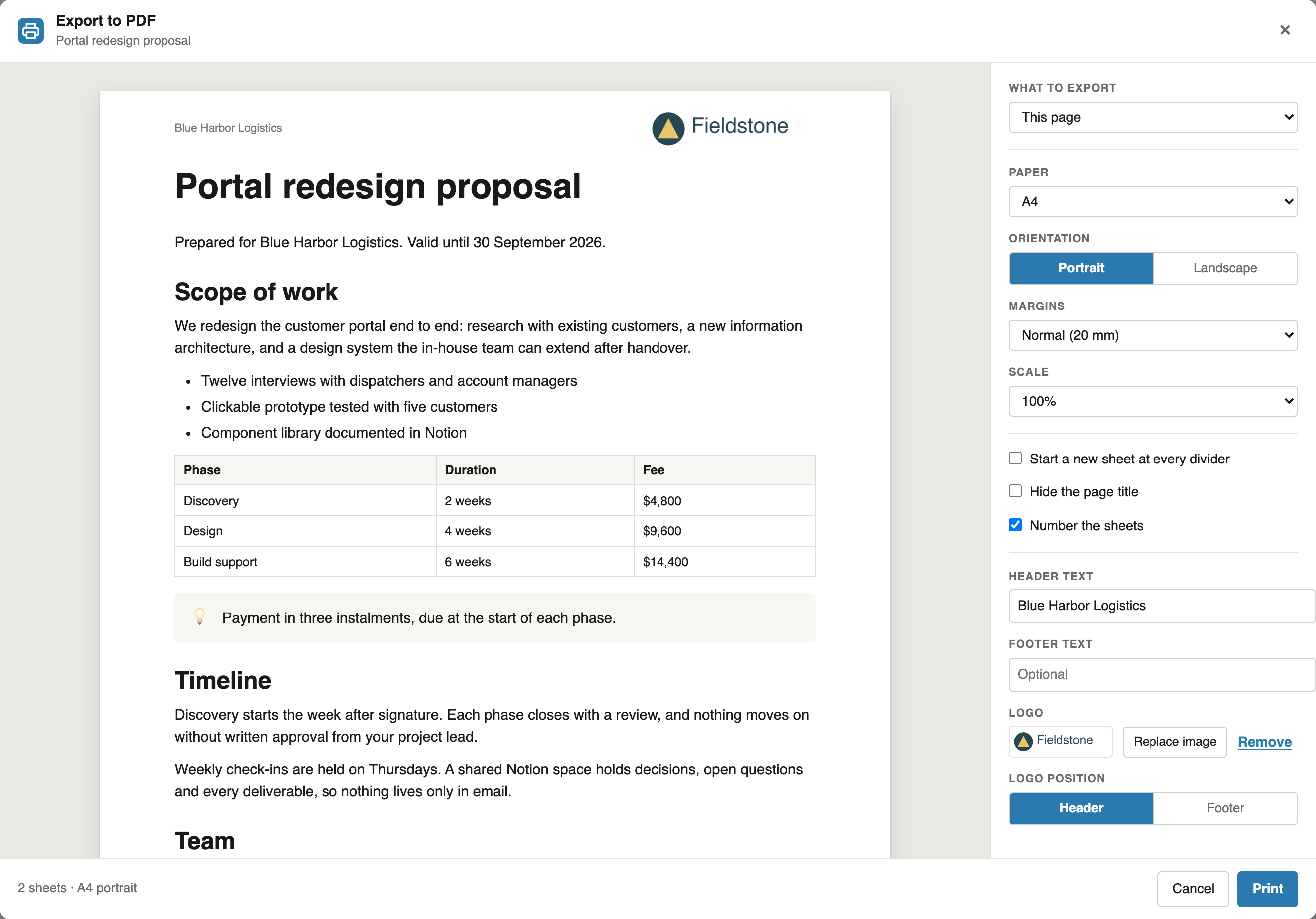
Notion's built-in PDF export in short
Notion's built-in PDF export saves a page as a PDF with a choice of paper size and scale, without header, footer, page numbers or a preview of the sheets. Its Include subpages option exists only on the Business and Enterprise plans and produces a zip file with a separate PDF for every page. A Notion plan is paid for every member of the workspace: Business costs $20 a member a month billed yearly. Notion PDF Export prints a page and its subpages as one PDF on any Notion plan, with Pro, which only the people who export need.
Compare
What Notion's own export leaves out
Notion's built-in PDF export is fine for a quick copy. This is for the documents that go to someone.
| Capability | Notion PDF Export | Notion's built-in export |
|---|---|---|
| Single page to PDF | Free, unlimited | Yes |
| Paper size, margins, orientation, scale | All four | Paper size and scale |
| Header, footer, page numbers | Yes | No |
| Preview of every sheet with its margins | Yes | No |
| A divider starts a new sheet | Yes | No |
| Page with all subpages | Pro, any Notion plan, one PDF | Business and Enterprise only, a zip of separate PDFs |
| Documents generated from a database | Pro | No |
| Your logo on every sheet | Pro | No |
Notion's export options as described in Notion's help centre, October 2026.
Subpages
Two ways to get subpages into a PDF
Notion's Business plan
- Include subpages is on Business and Enterprise only
- Notion bills a plan for every member of the workspace, not only for the people who export
- The export is a zip file with one PDF per page, sent as a download link by email
Notion PDF Export Pro
- Works on any Notion plan, Free and Plus included
- Only the people who export need Pro; everyone else exports single pages for free
- One PDF in reading order, up to five levels deep, with a header, footer and page numbers
Cost
What subpages in a PDF cost a year
Notion Business billed yearly against Pro Yearly, for workspaces of different sizes. A Business plan includes more than PDF export, such as SAML single sign-on and Notion's AI features.
| Workspace | Notion Business, every member | Pro for every member | Pro for 2 members who export |
|---|---|---|---|
| 1 member | $240 a year | $59 a year | - |
| 5 members | $1,200 a year | $265.50 a year | $118 a year |
| 10 members | $2,400 a year | $472 a year | $118 a year |
Notion Business: $20 a member a month billed yearly, $24 billed monthly (notion.com/pricing, October 2026). A workspace already on Plus, at $10 a member a month billed yearly, pays the difference to upgrade. Pro: $59 a year per seat, 10% off from 5 seats and 20% off from 10 seats; all Pro plans.
FAQ
Notion's built-in PDF export: common questions
Does Notion's own PDF export include subpages?
Only on the Business and Enterprise plans, where Include subpages makes a zip file with a separate PDF for every page and Notion emails a download link. On Free and Plus, each page is exported on its own.
Do I need a Notion Business plan to export subpages to PDF?
Not with Notion PDF Export. It prints a page and its subpages as one PDF on any Notion plan, Free and Plus included. Printing subpages is part of Pro.
What does a Business plan cost compared with Pro?
Notion lists Business at $20 a member a month billed yearly, or $24 billed monthly, and charges it for every member of the workspace (notion.com, October 2026). Pro costs $59 a year or $6.99 a month, only for the people who export.
Is Notion's built-in export enough for a single page?
For a quick copy, yes. It has no header, footer, page numbers or preview of the sheets, and sets only paper size and scale. Notion PDF Export does all of that for single pages for free.
Is Notion PDF Export made by Notion?
No. It is an independent Chrome extension, not affiliated with Notion Labs, Inc.
Try the free plan on your next page
Add the extension, open any Notion page and click PDF next to Share. Single pages stay free.
 Add to Chrome